
psna.store
Browse & purchase modded PlayStation avatars. Set any avatar as your active PSN profile picture.
How It Works
Browse the gallery, find an avatar you love, and click Buy Now. Complete payment on our Shopify store and we'll set it as your active avatar within 24—48 hours.
Pricing
Every modded avatar is $4 flat. No hidden fees. Secure checkout via Shopify.
Important
Modded avatars can only be your active avatar, they won't appear in your collection. If you change it, it's gone.
Recently Added
My Favorites
Your saved avatars and custom lists
Sign in to save favorites and create custom lists.
More from this game

Modded Trophy Levels
VITA trophies only. Levels can only increase and go to the level you pick. (e.g. You're level 139 and purchase level 500 → you'll be at level 500.)
Vouches
Screenshots from completed orders, paired with the delivered avatar.
Tools
Free tools built for the PlayStation modding community.
PS3 Avatar Organizer
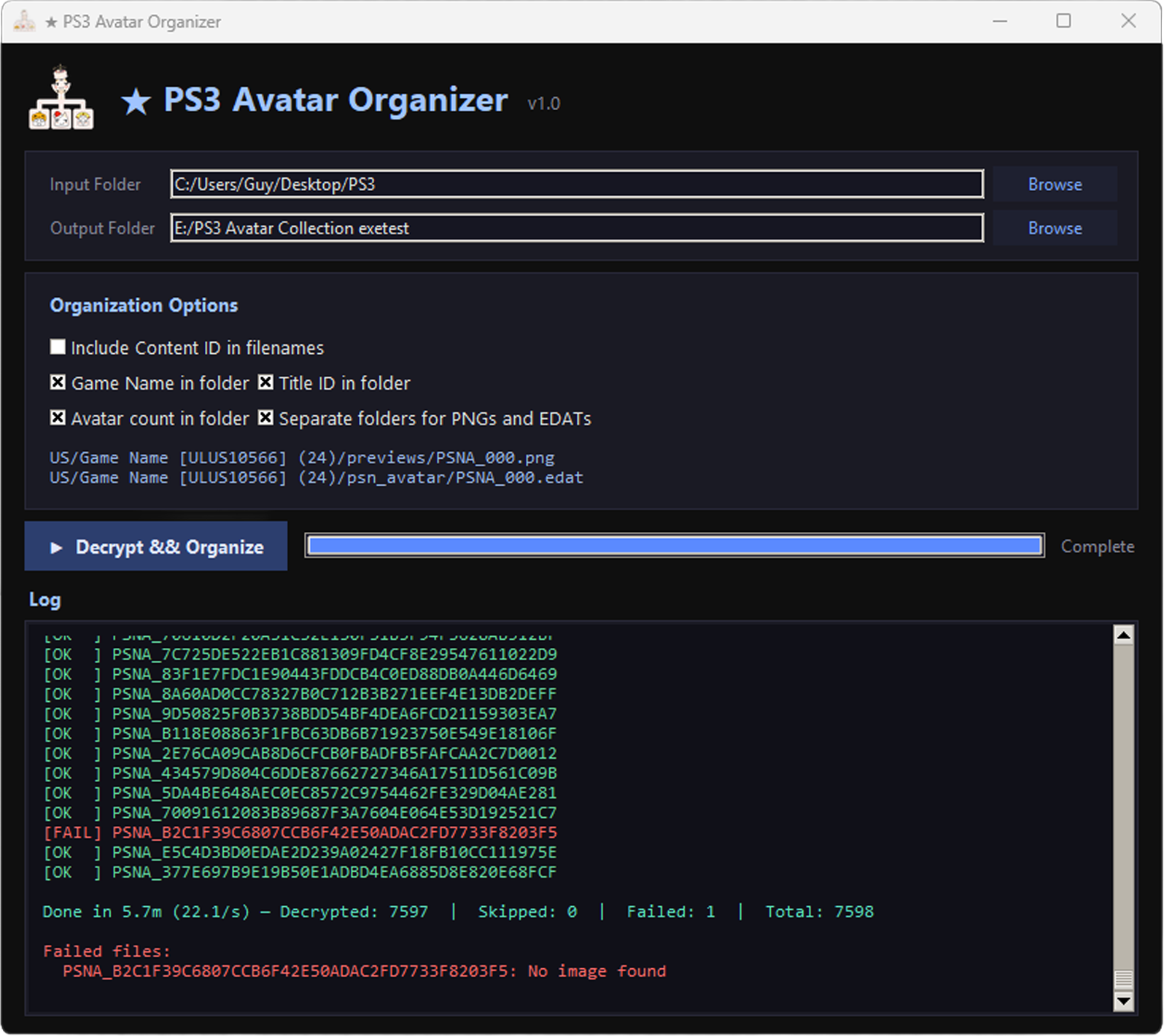
v1.2Decrypt and organize your PS3/PSN avatar collection. Reads encrypted EDAT avatar files, decrypts them using AES, extracts the Content ID from each header, and saves viewable PNG/JPG images. Choose from three output modes, export a signed manifest to link your collection to vault.psna.store, and rely on PSNA deduplication to keep your output clean.
Features
- Batch EDAT decryption to PNG/JPG
- Automatic Content ID extraction from headers
- Three output modes — Organized by game, Flat custom folder, or Flat separated
- Customizable folder structure (game name, Title ID, avatar count)
- Vault Export — generate a signed manifest to link your collection to vault.psna.store
- PSNA deduplication — normalized filenames prevent duplicate output PNGs
- Progress bar with detailed log output
- Persistent settings across sessions
Frequently Asked Questions
What is a modded avatar?
A modded avatar is any PlayStation avatar — including rare, delisted, or region-exclusive ones — set as your active PSN profile picture through our service. These aren't available through the normal PS Store.
Is this safe for my PSN account?
Yes. We use a device password (not your main password) to set the avatar. You can revoke the device password immediately after your order is completed. We also recommend enabling 2-Step Verification — see our Account Setup guide.
Will the avatar stay forever?
The modded avatar stays as your active avatar for as long as you don't change it. It won't appear in your avatar collection — once you switch to a different avatar, the modded one is gone.
How long does it take?
Orders are completed within 24 - 48 hours of payment. Most orders are done much sooner.
What do I need to provide?
After purchasing, you'll need to provide your PSN email address and a device password (not your main password). See our Account Setup guide for how to generate one.
Can I get a refund?
Since the avatar is set on your account immediately, we generally don't offer refunds after the service is completed. If there's an issue with your order, reach out and we'll work with you.
Do you have an avatar I'm looking for?
We have thousands of avatars from many regions and games. Use the search and filter tools in the gallery to find what you're looking for. If you can't find a specific avatar, feel free to ask.
Account Setup
1 Enable 2-Step Verification
- On the PS App or your PlayStation console, go to Settings → Account Management → Account Information → Security.
- Select 2-Step Verification.
- Choose Use Authenticator App or Use Phone Number (SMS).
- Follow the on-screen instructions to register your phone or scan the QR code.
- Enter the code provided by your authenticator or SMS to complete setup.
2 Generate a Device Password
- Visit Sony Account Management and sign in to your PSN account.
- Go to Security → Device Setup Password → Generate or Manage Device Setup Passwords.
Direct Link (idp.sn/device-password) - Click Generate New Password.
- Copy the 12-character password, this is your device password. You'll provide it at checkout.
Roadmap & Updates
Current Version
Accounts, Favorites & Tools
👤 Account System
- User registration and sign-in
- Persistent sessions across visits
- Account menu with quick access to saved content
⭐ Favorites & Lists
- Favorites — Save any avatar with the ☆ button; synced to your account
- Custom Lists — Create, rename, and delete named lists to organize avatars your way
- List picker shows which lists an avatar is already in and toggles add/remove in one tap
- Avatar detail pages show your list membership and how many users have saved the avatar
- Remove button on each card in the Favorites view
🏆 Vouches
- Community testimonials page showcasing real orders
- Screenshot vouches from verified customers
🛠️ PS3 Avatar Organizer Tool
- v1.0 — EDAT decryption, Content ID extraction, organize output by game
- v1.1 — Three output modes (Organized, Flat custom, Flat separated); Vault Export with HMAC-signed manifest; persistent settings
- v1.2 — PSNA filename normalization; fixed duplicate PNGs from renamed EDAT files
📦 Content
- 1,415 new avatars added — collection now at 9,012 avatars across 643 games
🔧 Fixes & Improvements
- Popularity sort now ranks all avatars correctly — previously capped at top 100
- Avatar detail pages show a live "Saved by X users" count
- Popularity rankings on avatar cards and detail pages reflect full dataset
- Improved mobile navigation and layout consistency
Planned Features
Community Features
🔍 Enhanced Discovery
- Similar avatar suggestions on detail pages
- Curated collections by theme or series
💬 Community
- User reviews and ratings
- Avatar request system
- Community showcase
Version History
Major UI/UX Overhaul
- Complete UI redesign with modern dark theme
- Enhanced mobile experience with bottom navigation bar
- Improved avatar gallery with infinite scroll
- Clickable avatar detail pages with full metadata
- Rare Avatar System — exclusive and hard-to-find avatars marked with ✦
- Popularity Tracking — trending avatars with real-time rankings
- Enhanced search with fuzzy matching; filter by region, game, rarity, and popularity
- 55 new avatars added; publisher information added to metadata
Initial Release
- Basic avatar gallery
- Search and filter functionality
- Shopify checkout integration
- Trophy level service
Contact
Have questions, need support, or want to get in touch? We're here to help!
Response Time
We typically respond within 24 hours during business days. For urgent matters related to active orders, please mention your order number in your message.